 English
 Русский

The unofficial logo of the SSH protocol. Image: Jessie Kirk / commons.wikimedia.org
SSH (Secure Shell) is a protocol that provides secure remote access and management of servers and network devices. It is widely used worldwide by system administrators to connect to remote machines, execute commands, and manage data over an encrypted connection. SSH is commonly used in server administration, software development, and network management.
SSH was created in 1995 by Finnish researcher Tatu Ylönen in response to a growing problem of network attacks that intercepted passwords and other sensitive data. Initially developed for a research project, the protocol quickly evolved into the de facto standard for secure remote access.
Key Features and Characteristics of SSH
-
Security.
SSH uses strong encryption to protect data from interception and tampering. -
Authentication support.
SSH supports multiple authentication methods, including passwords, public key authentication, and two-factor authentication. -
Tunneling capabilities.
SSH can create secure tunnels to transmit data over untrusted networks. -
Cross-platform support.
SSH works on most operating systems, including Linux, macOS, and Windows.
One of the few drawbacks of SSH is its configuration complexity, especially for beginners, who may find initial setup and key management challenging.
Software and Applications for Working with SSH
As mentioned above, SSH is supported on most operating systems, including desktop and mobile platforms. Below are some of the most commonly used SSH clients:
-
PuTTY (Windows).
One of the most popular SSH clients for Windows. PuTTY is free and supports not only SSH but also other protocols such as Telnet and Rlogin. Its simple interface makes it widely used for remote server administration. -
OpenSSH for Windows.
Microsoft has integrated OpenSSH into Windows 10 and newer versions, allowing users to work with SSH directly from PowerShell or the command line. This is a convenient option for those who prefer built-in Windows tools. -
OpenSSH (Linux).
In most Linux distributions, OpenSSH is installed by default. It is a powerful suite of tools that includes both server and client components. -
Terminal (macOS).
The built-in macOS Terminal supports SSH out of the box. Mac users can easily connect to remote servers using the ssh command directly from the terminal. -
Termius (iOS, Android).
One of the most popular mobile SSH applications. Termius supports key management, data synchronization across devices, and offers a user-friendly interface for managing remote servers.
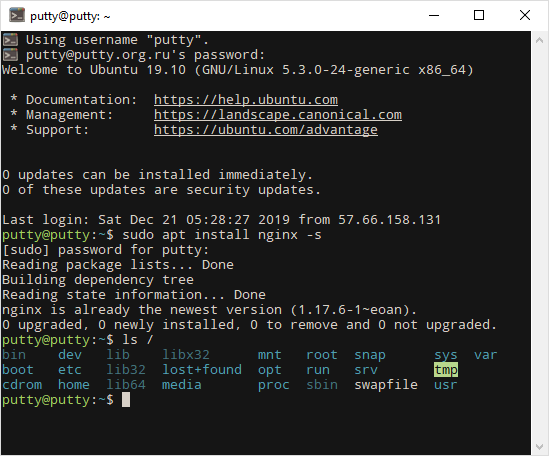
The PuTTY console when connecting to a remote server running Ubuntu OS
According to various sources, SSH is used on virtually all Linux and UNIX servers worldwide. More than 90% of software developers and IT professionals rely on SSH for remote management and secure access.